🎉 欢迎访问GreasyFork.Org 镜像站!本镜像站由公众号【爱吃馍】搭建,用于分享脚本。联系邮箱📮

Greasy fork 爱吃馍镜像

Greasy Fork is available in English.

📂 缓存分发状态(共享加速已生效)
🕒 页面同步时间:2025/12/28 21:54:02
🔄 下次更新时间:2025/12/28 22:54:02
手动刷新缓存

GitHub Commit Labels

Enhances GitHub commits with beautiful labels for conventional commit types (feat, fix, docs, etc.)

Verzia zo dňa 15.04.2025. Pozri najnovšiu verziu.

Na nainštalovanie skriptu si budete musieť nainštalovať rozšírenie, ako napríklad Tampermonkey, Greasemonkey alebo Violentmonkey.

Na inštaláciu tohto skriptu je potrebné nainštalovať rozšírenie, ako napríklad Tampermonkey.

Na nainštalovanie skriptu si budete musieť nainštalovať rozšírenie, ako napríklad Tampermonkey, % alebo Violentmonkey.

Na nainštalovanie skriptu si budete musieť nainštalovať rozšírenie, ako napríklad Tampermonkey alebo Userscripts.

Na inštaláciu tohto skriptu je potrebné nainštalovať rozšírenie, ako napríklad Tampermonkey.

Na inštaláciu tohto skriptu je potrebné nainštalovať rozšírenie správcu používateľských skriptov.

(Už mám správcu používateľských skriptov, nechajte ma ho nainštalovať!)

🚀 安装遇到问题?关注公众号获取帮助

公众号二维码

扫码关注【爱吃馍】

回复【脚本】获取最新教程和防失联地址

Na inštaláciu tohto štýlu je potrebné nainštalovať rozšírenie, ako napríklad Stylus.

Na inštaláciu tohto štýlu je potrebné nainštalovať rozšírenie, ako napríklad Stylus.

Na inštaláciu tohto štýlu je potrebné nainštalovať rozšírenie, ako napríklad Stylus.

Na inštaláciu tohto štýlu je potrebné nainštalovať rozšírenie správcu používateľských štýlov.

Na inštaláciu tohto štýlu je potrebné nainštalovať rozšírenie správcu používateľských štýlov.

Na inštaláciu tohto štýlu je potrebné nainštalovať rozšírenie správcu používateľských štýlov.

(Už mám správcu používateľských štýlov, nechajte ma ho nainštalovať!)

🚀 安装遇到问题?关注公众号获取帮助

公众号二维码

扫码关注【爱吃馍】

回复【脚本】获取最新教程和防失联地址

Autor
nazdridoy
Hodnotenie
0 0 0
Verzia
1.5.1
Vytvorené
07.02.2025
Aktualizované
15.04.2025
Veľkosť
70,9 KB
Licencia
MIT
Spustiť na

GitHub Commit Labels

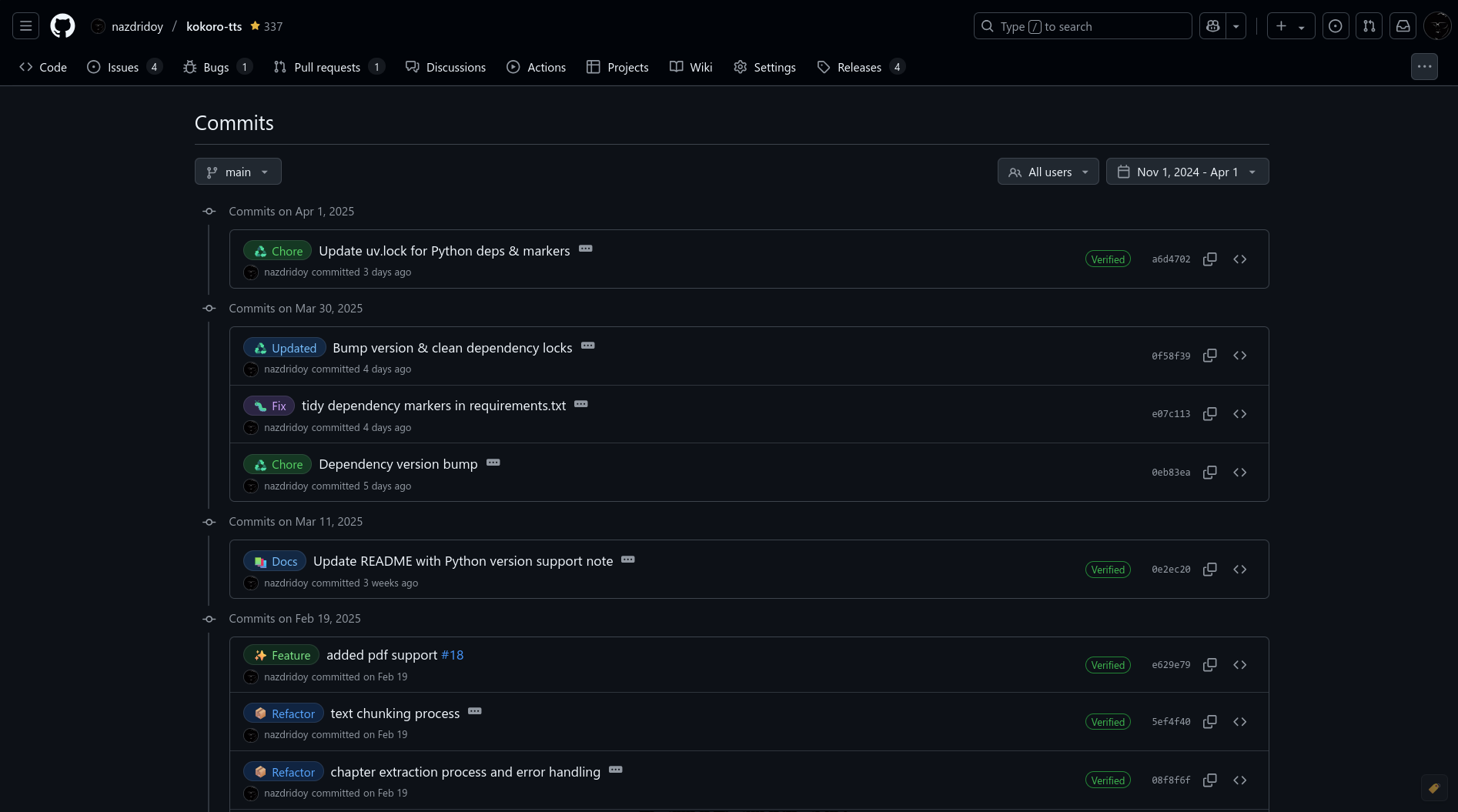
A userscript that enhances GitHub commits by adding beautiful labels for conventional commit types. It automatically detects commit types (like feat, fix, docs) and adds visually appealing labels to make your commit history more readable.
Features

  • 🏷️ Adds beautiful labels to conventional commit messages
  • 🎨 GitHub-style design that matches the platform
  • 🌓 Automatic theme detection (light, dark, and dark dimmed)
  • 💬 Informative tooltips showing detailed descriptions
  • 👆 Toggle button to quickly show/hide labels
  • 📤 Export/Import configurations for team sharing
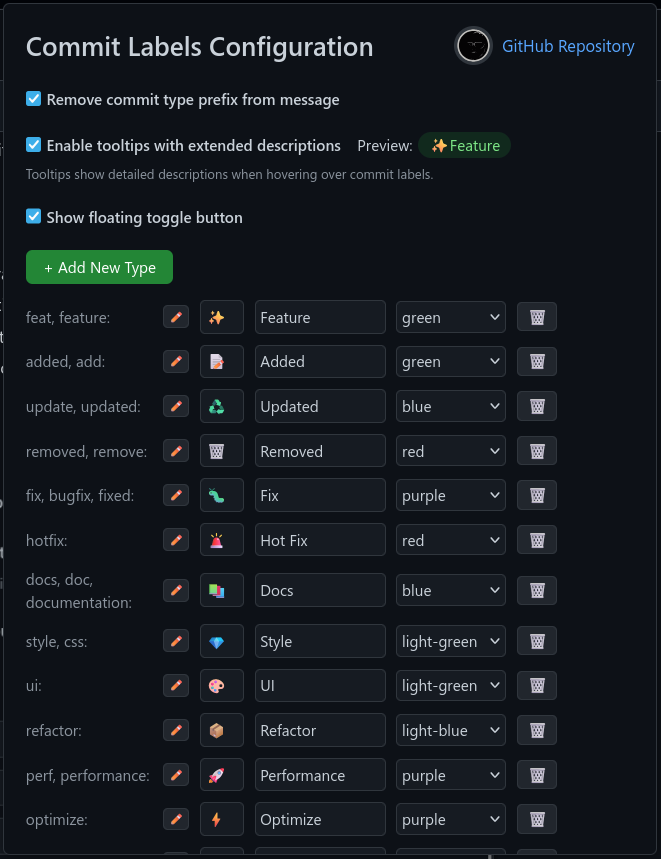
  • ⚙️ Fully customizable through a user-friendly configuration panel
  • 🔄 Supports multiple aliases for each commit type
  • 🎯 Works on commit history and single commit pages

preview1

Supported Commit Types

Default commit types and their aliases:

  • Feature: feat, feature
  • Added: added, add
  • Updated: update, updated
  • Removed: removed, remove
  • Fix: fix, bugfix, fixed
  • Hot Fix: hotfix
  • Documentation: docs, doc, documentation
  • Style: style, css
  • UI: ui
  • Refactor: refactor
  • Performance: perf, performance
  • Optimize: optimize
  • Test: test, tests, testing
  • Build: build
  • CI/CD: ci, cd
  • Deploy: deploy, release
  • Dependencies: deps, dep, dependencies
  • Chore: chore
  • Revert: revert
  • WIP: wip
  • Security: security
  • Internationalization: i18n
  • Accessibility: a11y
  • API: api
  • Database: data
  • Configuration: config
  • Initial Setup: init
  • You Can ADD More

Example Commit Formats

Here are some examples of how to format your commits to get the labels:

# Basic format
feat: add new login functionality
fix: resolve authentication bug
docs: update API documentation

# With scope
feat(auth): implement OAuth2 login
fix(api): handle rate limiting errors
docs(readme): add installation guide
style(button): improve hover effects
refactor(service): clean up user service code
perf(db): optimize database queries
test(auth): add unit tests for auth service

The script will automatically detect the commit type from the first word of your commit message and add the appropriate label. Make sure to:

  1. Use one of the supported commit types or their aliases
  2. Follow the format: type(scope): description or type: description
  3. Keep the commit message clear and concise
  4. Use meaningful scopes that describe the area of the codebase being changed

Installation

  1. Install a userscript manager:

  2. Install the script:

Configuration

  1. Click on your userscript manager's icon
  2. Select "GitHub Commit Labels" > "Configure Commit Labels"
  3. Customize:
    • Add/remove commit types
    • Edit aliases
    • Change emojis
    • Modify colors
    • Toggle prefix removal
    • Enable/disable tooltips
    • Show/hide floating toggle button
    • Export/Import your configuration

preview2

Development

To contribute or modify the script:

  1. Clone the repository:

    git clone https://github.com/nazdridoy/github-commit-labels.git
    
  2. Make your changes to github-commit-labels.js

  3. Test the script by loading it in your userscript manager

  4. Submit a pull request with your changes

License

MIT License - see LICENSE for details

Credits

Created by nazdridoy

Support

If you encounter any issues or have suggestions: