🎉 欢迎访问GreasyFork.Org 镜像站!本镜像站由公众号【爱吃馍】搭建,用于分享脚本。联系邮箱📮

Greasy fork 爱吃馍镜像

Загрузчик Instagram

Добавьте кнопки для загрузки или открытия медиа

Устаревшая версия за 26.11.2023. Перейдите к последней версии.

Чтобы установить этот скрипт, вы сначала должны установить расширение браузера, например Tampermonkey, Greasemonkey или Violentmonkey.

You will need to install an extension such as Tampermonkey to install this script.

Чтобы установить этот скрипт, вы сначала должны установить расширение браузера, например Tampermonkey или Violentmonkey.

Чтобы установить этот скрипт, вы сначала должны установить расширение браузера, например Tampermonkey или Userscripts.

Чтобы установить этот скрипт, сначала вы должны установить расширение браузера, например Tampermonkey.

Чтобы установить этот скрипт, вы должны установить расширение — менеджер скриптов.

(у меня уже есть менеджер скриптов, дайте мне установить скрипт!)

🚀 安装遇到问题?关注公众号获取帮助

公众号二维码

扫码关注【爱吃馍】

回复【脚本】获取最新教程和防失联地址

Чтобы установить этот стиль, сначала вы должны установить расширение браузера, например Stylus.

Чтобы установить этот стиль, сначала вы должны установить расширение браузера, например Stylus.

Чтобы установить этот стиль, сначала вы должны установить расширение браузера, например Stylus.

Чтобы установить этот стиль, сначала вы должны установить расширение — менеджер стилей.

Чтобы установить этот стиль, сначала вы должны установить расширение — менеджер стилей.

Чтобы установить этот стиль, сначала вы должны установить расширение — менеджер стилей.

(у меня уже есть менеджер стилей, дайте мне установить скрипт!)

🚀 安装遇到问题?关注公众号获取帮助

公众号二维码

扫码关注【爱吃馍】

回复【脚本】获取最新教程和防失联地址

Автор
ZhiYu_
Оценки
0 0 0
Версия
1.17.14
Создано
05.07.2020
Обновлено
26.11.2023
Размер
31,3 КБ
Совместимость
Совместим с Chrome
Лицензия
MIT
Работает на

Instagram Download Button

Github, Greasy Fork , OpenUserJS

Instagram changes their front-end frequently, but I'm focusing on my full time job now. Which means I may not fix this script in a short time if this script breaked by Instagram web changing. Thank you for your patience.

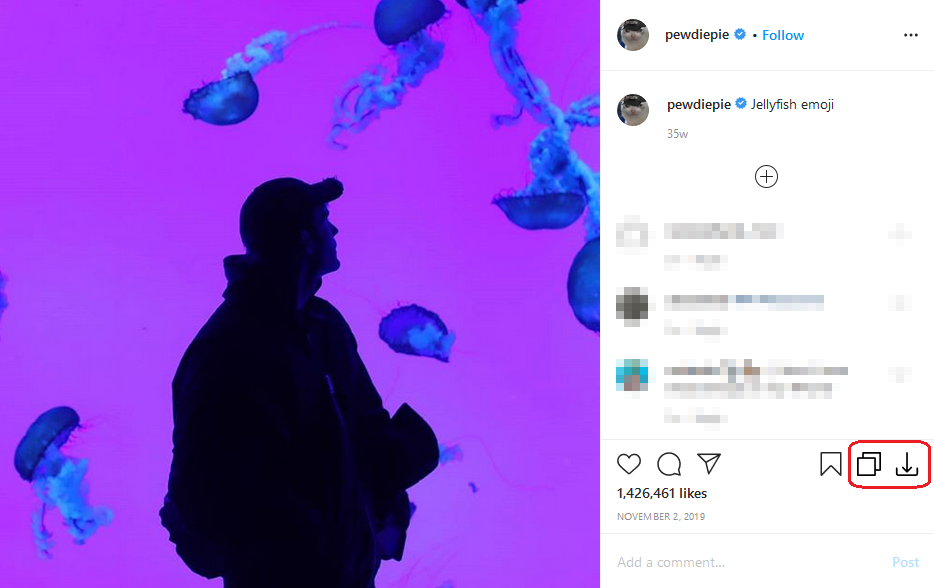
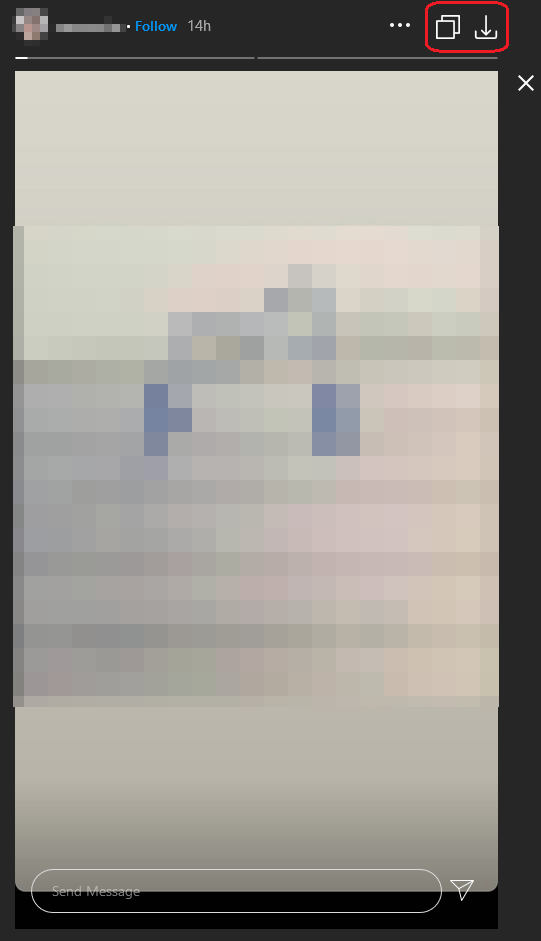
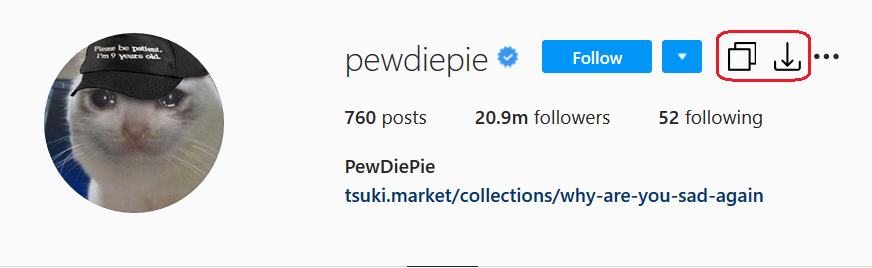
This repository is a JavaScript for Greasemonkey/Tampermonkey. This script will add a download button and open button to your Instagram and you can download or open profile pictures, media in the posts, stories, and highlights by one click.

The newer versions code only do some simple tests on Chrome. So if you have any problem, please feel free to contact me in English or Chinese and attach the detail information such as your runtime environment, IG post url, etc.

Note: This script only tests on Chrome , Edge, and Firefox with Tampermonkey on Windows 10 1903 64-bit.

Caution

  • Some user feedback that account be logged out when this script is enabled, please disable this script if you meet a similar issue.
  • There is some feedback provided by users that Instagram will block your account for a few hours (maybe longer) if you download too much media in a short time. So please mind the download number.
  • Doesn't support reels page (i.e., https://www.instagram.com/reels/)

Issues

  • Sometimes may not work on the main feed
  • May be loged out when this script enabled
  • May break the layout
  • May not work on in private account post due to no share button
  • May not work with saved posts
  • May get lower resolution Story media

About the new url fetch method

Around May 2022, Instagram modified the web page so that some media could not be downloaded (especially Reels). From this script version 1.13, a new method of fetching media url has been added and is enabled by default (not yet applied to Story). This new method can obtain full resolution pictures (to be verified) and all media can be downloaded at present, but the disadvantage is that the speed of fetching URLs is slow (download speed has no effect) and may have some bugs. You can set disableNewUrlFetchMethod to true if you don't want to use the new method. Or you can set prefetchAndAttachLink to true in order to prefetch the URL info.

Options

This script can be configured by modifying the following constant variables in the head of this script.

  • disableNewUrlFetchMethod : boolean, disable new url fetch method which uses info API
  • prefetchAndAttachLink : boolean, attach the link into the button elements if true
  • hoverToFetchAndAttachLink : boolean, fetch and add link when hover the button
  • postFilenameTemplate : string, naming rule for media downloading in the post
  • storyFilenameTemplate : string, naming rule for media downloading in the story
  • replaceJpegWithJpg : boolean, replace .jpeg with .jpg if true

Naming Template

  • %id% : the poster id
  • %datetime% : the media upload time, see next section for the datatime format
  • %medianame% : the original media file name
  • %postId% : the post id
  • %mediaIndex% : the media index in multiple-media posts
  • %ext% : the file extension of media

Datetime Template

  • %y% : year (4 digits)
  • %m% : month (01-12)
  • %d% : day (01-31)
  • %H% : hour (00-23)
  • %M% : min (00-59)
  • %S% : sec (00-59)

Shortcut Keys (May not work in newer versions)

  • Alt + i : Open the media in the new tab
  • Alt + k : Download the media
  • Alt + j : Next media in the multiple media post
  • Alt + l : Previous media in the multiple media post

The shortcut keys do not work on the Instagram main page currently
Contributors who aren't listed in the GitHub contributors list (sort by contribution time)

Preview

drawing
drawing
drawing

License

MIT