🎉 欢迎访问GreasyFork.Org 镜像站!本镜像站由公众号【爱吃馍】搭建,用于分享脚本。联系邮箱📮

Greasy fork 爱吃馍镜像

nicovideo downloader

script for downloading videos from the nicovideo website

You will need to install an extension such as Tampermonkey, Greasemonkey or Violentmonkey to install this script.

You will need to install an extension such as Tampermonkey to install this script.

You will need to install an extension such as Tampermonkey or Violentmonkey to install this script.

You will need to install an extension such as Tampermonkey or Userscripts to install this script.

You will need to install an extension such as Tampermonkey to install this script.

You will need to install a user script manager extension to install this script.

(I already have a user script manager, let me install it!)

🚀 安装遇到问题?关注公众号获取帮助

公众号二维码

扫码关注【爱吃馍】

回复【脚本】获取最新教程和防失联地址

You will need to install an extension such as Stylus to install this style.

You will need to install an extension such as Stylus to install this style.

You will need to install an extension such as Stylus to install this style.

You will need to install a user style manager extension to install this style.

You will need to install a user style manager extension to install this style.

You will need to install a user style manager extension to install this style.

(I already have a user style manager, let me install it!)

🚀 安装遇到问题?关注公众号获取帮助

公众号二维码

扫码关注【爱吃馍】

回复【脚本】获取最新教程和防失联地址

Penulis
soundboy_1459944
Pemasangan harian
2
Total pemasangan
41
Nilai
0 0 1
Versi
0010
Dibuat
05 September 2025
Diperbarui
21 Oktober 2025
Size
110 KB
Lisensi
CC0 1.0
Berlaku untuk

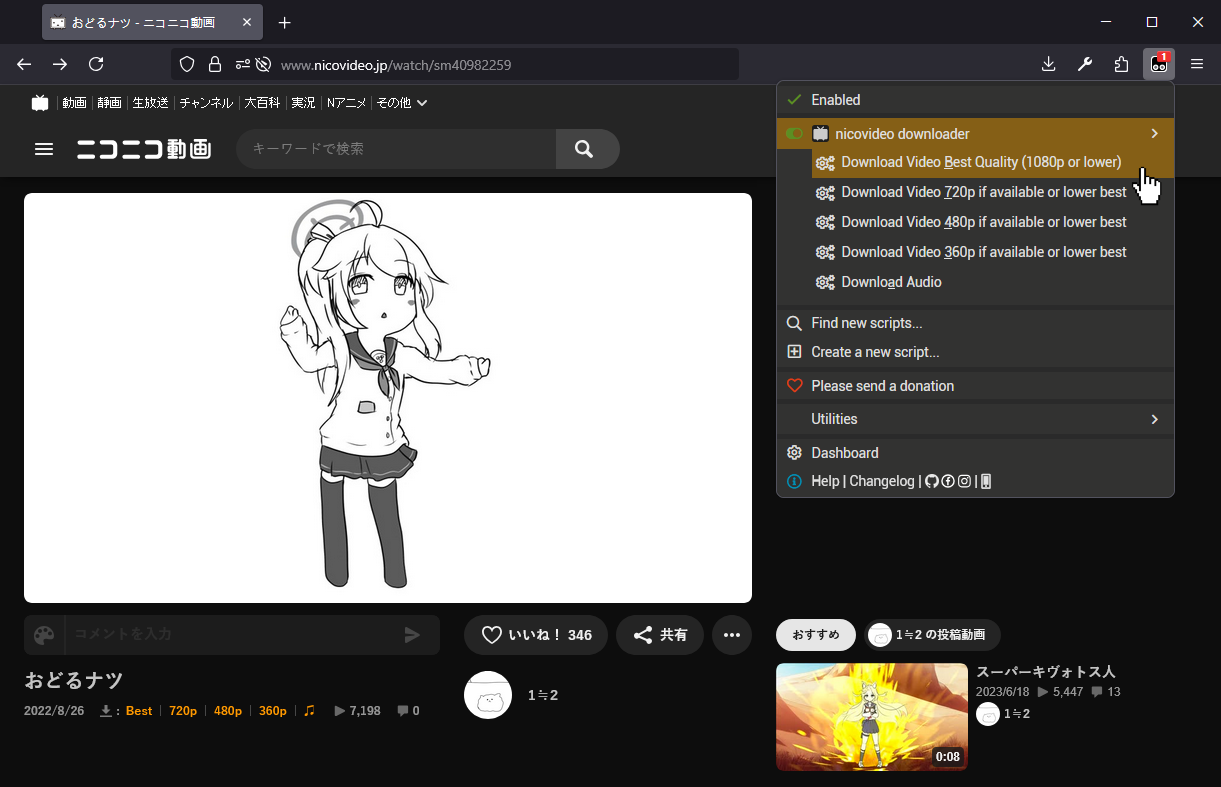
This is a script for downloading videos and audios from the NicoVideo website.

This script implements Nicozon's video/audio download method (Nicozon's bookmarklet scripts)[1][2] into an easy-to-use standalone userscript.

General Information:

You may not be able to download long videos due to insufficient memory.
If you want to download in 1080p, you can do so by logging in to NicoNico Douga with your premium membership account in your browser.
If left-clicking on the download link doesn't work for any reason, try middle-clicking on it instead.

Download options:

Best – Tries to Download the Video in the best available quality (1080p or lower).
720p – Tries to Download the Video in 720p resolution, if it is available. Otherwise, download the best lower resolution available.
480p – Tries to Download the Video in 480p resolution, if it is available. Otherwise, download the best lower resolution available.
360p – Tries to Download the Video in 360p resolution, if it is available. Otherwise, download the best lower resolution available.
Audio – Downloads Audio
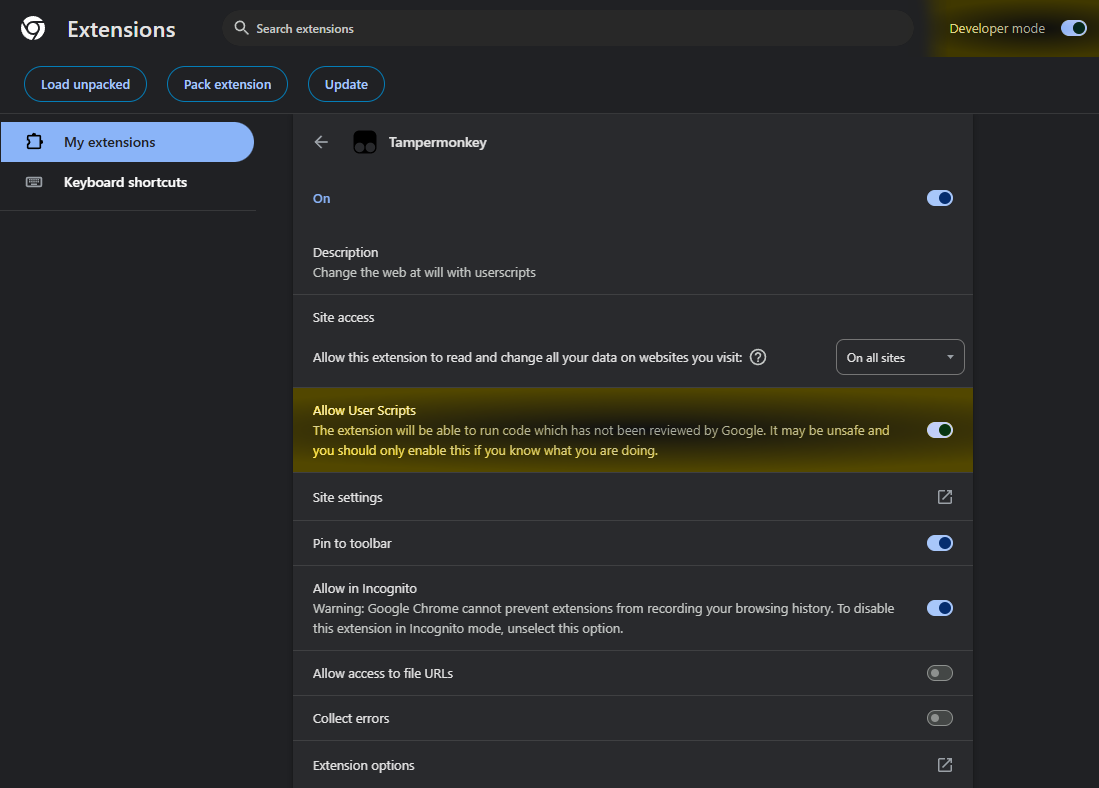
Installation Guide:

  1. Install a UserScript Manager, such as Tampermonkey or Violentmonkey.
  2. Enable Developer Mode and Allow User Scripts in the Extension Settings.
  3. Install the script.

Troubleshooting & Feedback

If you encounter any problems with this script, please let me know by providing the following information. The more details you can provide, the faster I can help you.

  1. A clear description of the problem.
  2. Steps to reproduce the issue.
  3. Technical Environment:
    • Web Browser: (e.g., Chrome 121, Firefox 115, Safari 17)
    • UserScript Manager: (e.g., Tampermonkey 5.2.0, Violentmonkey 2.19.0, Greasemonkey 4.11)
    • Script Version
  4. Other Extensions & Software:
    • Are you using any other web extensions (e.g., ad-blockers, privacy badger, NoScript, uBlock Origin, disable CSP/CORP etc.)? If yes, please list them.
    • Are you using any other UserScripts on the NicoVideo website? If yes, please list them.
    • Are you using a VPN or security software that might interfere with web traffic?
  5. Error Details (Crucial for diagnosis):
    • Browser Console Logs: Please open the Browser Console (usually under Developer Tools) and look for any red error messages when the problem occurs. Copy and paste the full text of any relevant errors.
    • Screenshots: If applicable, please provide a screenshot that visually demonstrates the issue.