🎉 欢迎访问GreasyFork.Org 镜像站!本镜像站由公众号【爱吃馍】搭建,用于分享脚本。联系邮箱📮

Greasy fork 爱吃馍镜像

Greasy Fork is available in English.

📂 缓存分发状态(共享加速已生效)
🕒 页面同步时间:2025/12/30 19:56:21
🔄 下次更新时间:2025/12/30 20:56:21
手动刷新缓存

يعرض Github أحجام الملف والمجلد

يعرض حجم كل ملف ومجلد في مستودع GitHub. يستخدم واجهة برمجة تطبيقات Github للحصول على التفاصيل ، بما في ذلك أحجام المجلدات المتكررة ، مما يجعل من السهل رؤية الحجم الإجمالي للدلائل المتداخلة. عرض حجم الملف في KB أو MB أو GB

You will need to install an extension such as Tampermonkey, Greasemonkey or Violentmonkey to install this script.

You will need to install an extension such as Tampermonkey to install this script.

You will need to install an extension such as Tampermonkey or Violentmonkey to install this script.

You will need to install an extension such as Tampermonkey or Userscripts to install this script.

You will need to install an extension such as Tampermonkey to install this script.

You will need to install a user script manager extension to install this script.

(I already have a user script manager, let me install it!)

🚀 安装遇到问题?关注公众号获取帮助

公众号二维码

扫码关注【爱吃馍】

回复【脚本】获取最新教程和防失联地址

You will need to install an extension such as Stylus to install this style.

You will need to install an extension such as Stylus to install this style.

ستحتاج إلى تثبيت إضافة مثل Stylus لتثبيت هذا النمط.

ستحتاج إلى تثبيت إضافة لإدارة أنماط المستخدم لتتمكن من تثبيت هذا النمط.

ستحتاج إلى تثبيت إضافة لإدارة أنماط المستخدم لتثبيت هذا النمط.

ستحتاج إلى تثبيت إضافة لإدارة أنماط المستخدم لتثبيت هذا النمط.

(لدي بالفعل مثبت أنماط للمستخدم، دعني أقم بتثبيته!)

🚀 安装遇到问题?关注公众号获取帮助

公众号二维码

扫码关注【爱吃馍】

回复【脚本】获取最新教程和防失联地址

المؤلف
人民的勤务员
التثبيت اليومي
0
إجمالي التثبيت
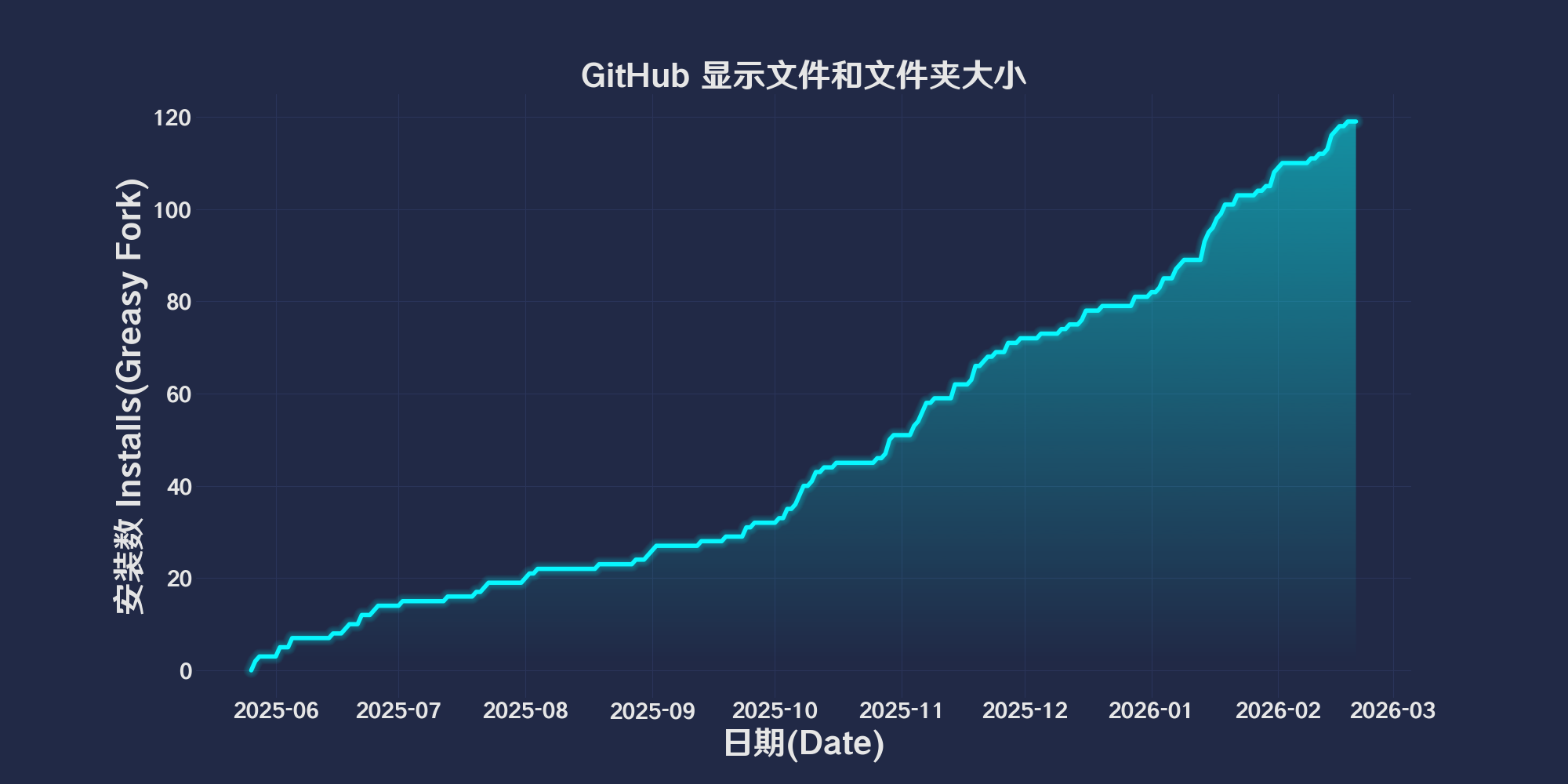
81
التقييمات
0 0 0
الإصدار
2025.9.2.1
تم إنشاؤه
26-05-2025
تم تحديثه
02-09-2025
الحجم
85.6 KB
التوافق
متوافق مع Firefox متوافق مع Chrome متوافق مع Opera متوافق مع Safari متوافق مع Edge
الترخيص
MIT
ينطبق على

简体中文 | English | 한국어 | Tiếng Việt | 繁體中文

👆️access GitHub Readme file on for a better experience。

Recommended use:
Support
Support
Support
💡 Tip: The script manager and browser listed above do not represent all
The script runs normally in the following environment
Passed

GitHub displays file and folder sizes

「 Displays the size of each file and folder in the GitHub repository. It uses the GitHub API to get details, including recursive folder sizes, making it easy to see the total size of nested directories. Display file size in KB, MB, or GB 」

Views

Download:Github | ⭐Greasy Fork

Update records

🛠️ GitHub Show file and folder sizes Update log

📅 2025.9.2.1

New: aspen138exist#188 Added new featuresDisplay the number of files
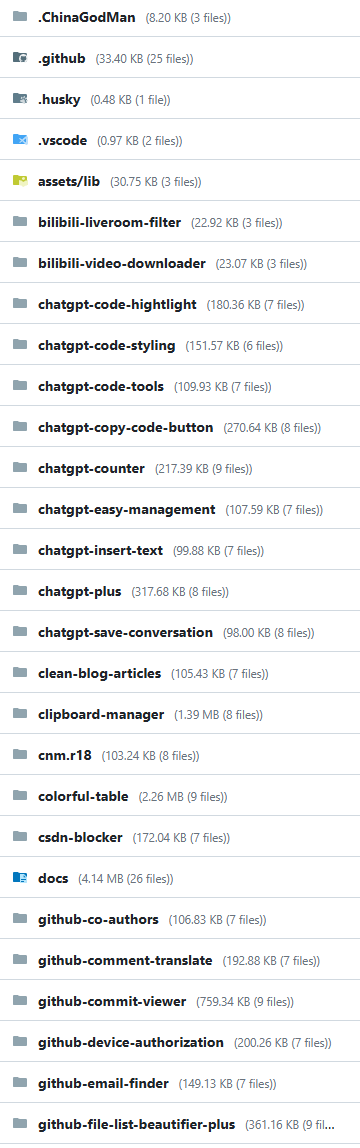
Function display Function display

GitHub File Size Viewer (GitHub document/Folder Size Display Tool)

This script passes GitHub API Get the size of files and folders,and display it in GitHub Files corresponding to the warehouse page/Next to the folder link。
Support recursive calculation of folder size,Provides a humanized size format。

Functional Features

  • show GitHub File and folder size
  • Automatically recursively calculate the total folder size
  • In the file/Display size visually next to the folder link

How to use

  • Make sure the configuration is valid GitHub Personal access token(GITHUB_TOKENHereGenerate a new token,To avoid API Request restrictions。
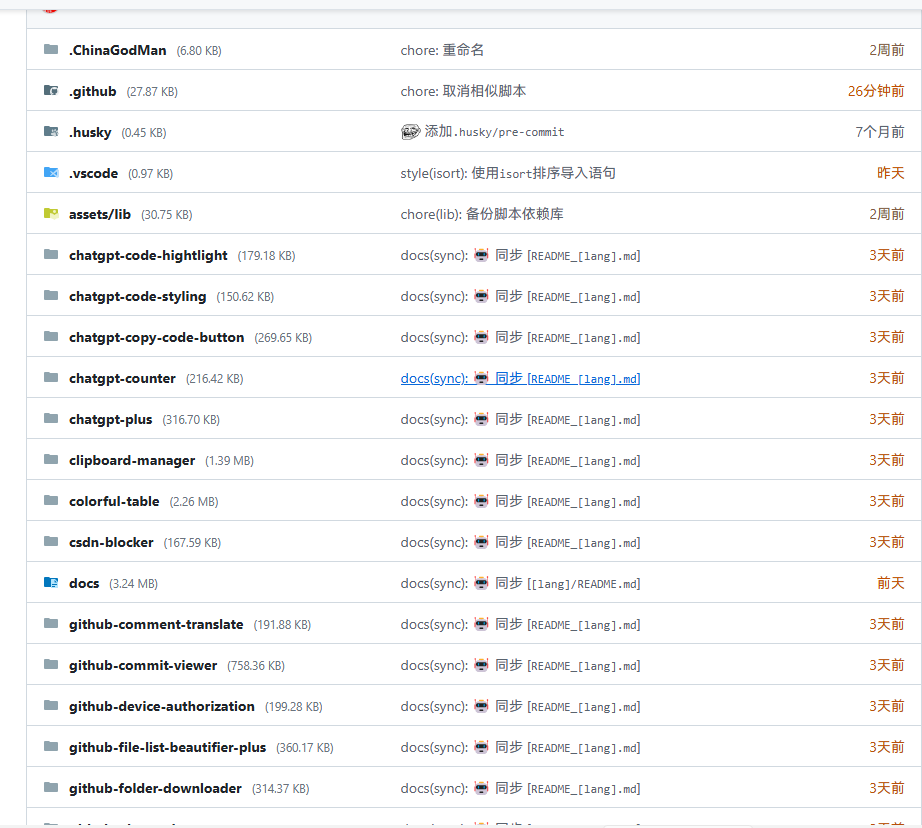
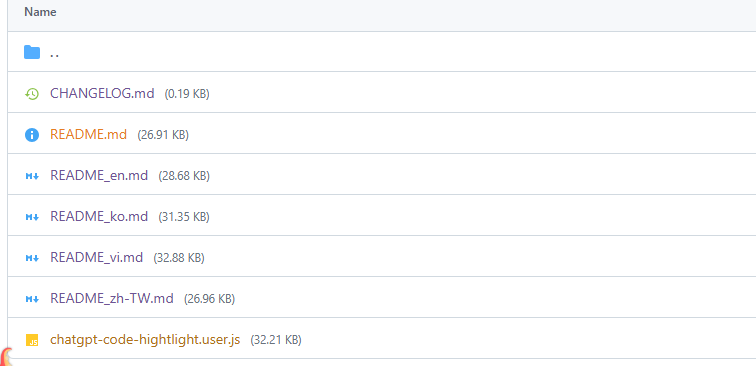
  • Open any GitHub Warehouse page,The script will run automatically,And in the file/Display size next to folder link。

💖 The script referenced or used the following script:

GitHub File Size Viewer

2025.05.26 2025.05.26

Help

Recommended browser and script manager:

  • Greasemonkey + Waterfox
  • Tampermonkey/Violentmonkey + Firefox
  • Tampermonkey/Violentmonkey + Chrome
  • Userscripts + ios Safari
  • Violentmonkey/KiWiBrowser + Android

If you need to learn more about how to install user scripts,Click meView the teaching of pictures and texts!

View all publish scripts